Mastering Visual Depth: A Comprehensive Guide to the 3D Text Effect Style in Adobe Illustrator
In the evolving landscape of digital design, the ability to create depth and dimension within a two-dimensional workspace is a skill that separates amateur graphics from professional-grade assets. Among the various tools available to achieve this, the 3D Text Effect Style stands out as a pivotal resource for designers working within the Adobe Illustrator ecosystem. Unlike traditional font files that merely dictate the shape of characters, a text effect style operates as a dynamic layer of visual instruction, applying complex gradients, shadows, highlights, and extrusions to existing vector paths. This distinction is crucial for understanding how modern graphic styles function and why they have become indispensable for creators ranging from hobbyists to corporate branding experts.
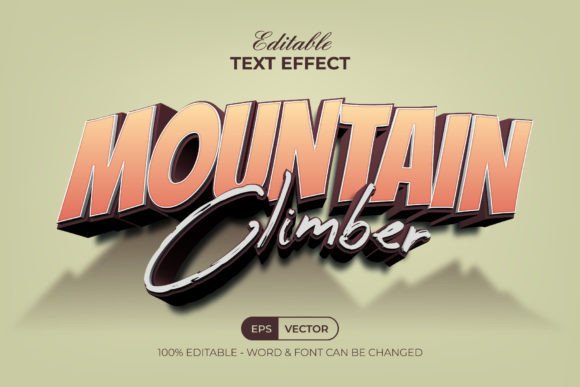
The specific utility of a 3D Text Effect Style lies in its non-destructive nature and its seamless integration into the Graphic Styles menu. When a designer acquires a set of these effects, they are not limited to a static image; rather, they gain access to a flexible system where any text or shape can be instantly transformed. The workflow is streamlined: a user types their desired copy, selects the object, and applies the style from the menu. Immediately, flat vectors are converted into rich, three-dimensional representations. This capability eliminates the need for manual gradient mesh creation or complex blending mode calculations, which traditionally consume hours of production time. By leveraging pre-configured styles, professionals can maintain high output velocities without sacrificing visual fidelity.
The Technical Architecture of Vector-Based 3D Effects
To fully appreciate the value of these tools, one must understand the technical architecture behind them. A standard font file contains outlines that define the letterforms. In contrast, a 3D Text Effect Style is a collection of appearance attributes saved within an Adobe Illustrator file. These attributes include multiple fills and strokes, each with specific opacity settings, blend modes, and transformation matrices. When applied, the software stacks these attributes to simulate lighting conditions, material textures, and spatial depth. Because the underlying structure remains vector-based, the resulting artwork retains infinite scalability. Whether the final output is a business card or a billboard, the edges remain crisp, and the dimensional details do not pixelate.
A significant advantage of using well-organized graphic styles is the preservation of editability. In many lower-quality presets, applying an effect might require expanding the appearance, which converts the live text into uneditable paths. However, premium sets, such as those including EPS and AI files with organized layers, ensure that the text remains live. This means a designer can correct a typo, change the wording, or switch the typeface entirely after the effect has been applied, and the 3D styling will automatically re-render on the new characters. This feature is particularly vital in iterative design processes where client feedback often necessitates last-minute copy changes. The ability to toggle between different fonts while maintaining the consistent volumetric look of the 3D Text Effect Style provides a level of agility that manual modeling cannot match.
Workflow Efficiency and File Organization
The efficiency of a design workflow is often dictated by the organization of its assets. High-quality effect packs typically come with a suite of files designed to facilitate immediate use. A standard delivery might include an EPS file for broad compatibility, an AI file optimized for recent versions of Adobe Illustrator CC, a JPEG preview for quick visual reference, and a Read Me text file containing essential information such as font download links. This comprehensive approach ensures that the user is not left guessing about dependencies. Since many 3D effects rely on specific typefaces to achieve the intended geometric proportions, providing direct links to free fonts used in the design removes a common barrier to entry. Users can install the recommended typography and immediately replicate the preview images with precision.
Furthermore, the internal organization of layers within the source file plays a critical role in customization. A well-structured file allows advanced users to dive into the appearance panel and tweak individual components of the effect. For instance, if a project requires a shift from a metallic gold finish to a matte plastic look, a designer can isolate the highlight layers or adjust the color values within the RGB spectrum without dismantling the entire effect. This granularity transforms the 3D Text Effect Style from a static preset into a modular design system. It empowers educators teaching vector graphics to demonstrate how complex visuals are constructed from simple stacked attributes, offering a practical learning tool for students exploring the depths of Adobe Illustrator.
Diverse Applications Across Industries
The versatility of 3D text effects extends far beyond simple logo design. In the realm of marketing and advertising, bold, dimensional typography is frequently used to grab attention in social media campaigns, video thumbnails, and web banners. The psychological impact of 3D text suggests tangibility and importance, making it an effective tool for highlighting key messages or promotional offers. Content creators, particularly those in the gaming and entertainment sectors, utilize these styles to craft titles that evoke a sense of immersion and excitement. The ability to rapidly generate varied looks—from retro neon signs to futuristic chrome lettering—allows these creators to maintain a fresh visual identity across numerous projects.
Educators and researchers also find value in these tools when creating presentation materials or instructional diagrams. Using 3D text can help differentiate headings from body content, guiding the viewer's eye through complex information structures. In academic posters or conference slides, a subtle application of a 3D Text Effect Style can add a layer of professionalism and polish that distinguishes the work from standard template-based designs. Similarly, small business owners who manage their own branding can leverage these easy-to-edit styles to produce high-quality merchandise mockups, signage drafts, and digital advertisements without needing to hire a specialized 3D artist. The low barrier to entry democratizes high-end visual production, allowing individuals with basic Illustrator knowledge to achieve results that previously required advanced modeling skills.
Color Management and Output Considerations
When working with digital effects, color management is a paramount consideration. Most 3D Text Effect Style packages are built using the RGB color mode, which is ideal for screen-based media including websites, mobile applications, and digital displays. RGB allows for a broader gamut of vibrant colors and luminous highlights that are essential for achieving realistic lighting effects like gloss and reflection. However, designers intending to use these effects for print media must be aware of the conversion process. While the vector paths themselves translate perfectly to CMYK, the specific gradient blends and transparency settings may shift slightly during conversion. It is advisable for print-focused projects to test the output early or adjust the color values within the graphic style to ensure the dimensional integrity is maintained in the final physical product.
The inclusion of a "Read Me" file in effect packages often provides guidance on these technical nuances, reinforcing the importance of reading documentation before beginning a project. Understanding whether a style relies on global swatches or specific blend modes can save hours of troubleshooting. Moreover, the compatibility with Adobe Illustrator CC and above ensures that users benefit from the latest rendering engines and performance improvements. Older versions of the software might struggle with complex appearance stacks, leading to slower redraw times or unexpected visual artifacts. Staying updated with the software version guarantees that the 3D Text Effect Style performs as intended, delivering smooth previews and rapid export times.
Customization and Creative Expansion
While ready-made styles offer convenience, their true potential is unlocked through customization. The fact that these effects are 100% editable opens the door to endless creative variations. A designer might take a standard chrome style and alter the ambient light color to match a brand's specific palette, or they might combine elements from two different styles to create a unique hybrid look. The organized layer structure facilitates this experimentation, allowing users to isolate shadows, mid-tones, and specular highlights. This modularity encourages a deeper understanding of light and form, turning the application of a preset into an educational exercise in visual physics.
Additionally, these styles are not limited to typography alone. Because they are applied via the Graphic Styles menu, they can be mapped onto any vector shape. This means icons, logos, abstract illustrations, and UI elements can all inherit the same dimensional qualities as the text, creating a cohesive visual language throughout a design project. A button in a mobile app interface, for example, can share the exact same bevel and lighting characteristics as the header text, ensuring a unified user experience. This adaptability makes the 3D Text Effect Style a foundational element in building comprehensive design systems rather than just a tool for headline generation.
In conclusion, the integration of sophisticated text effects into the daily workflow of a graphic designer represents a significant leap in productivity and creative possibility. By utilizing structured, editable, and high-quality 3D styles, professionals can bypass the tedious aspects of manual shading and focus on composition, messaging, and brand strategy. Whether for a quick social media post or a major branding overhaul, the ability to instantly apply and modify complex 3D aesthetics ensures that the final output is both visually striking and technically sound. As the demand for engaging visual content continues to rise, mastering these tools becomes not just an option, but a necessity for anyone looking to make a lasting impression in the digital space.